
How to Redeem UPI Cash on CashBoo: A Clear Walkthrough
Published 28 September 2026 · Updated 29 September 2026
By Vishal Kumar — Content & Growth at CashBoo — tests every earning method and payout flow first-hand
Picture a college student in Pune who has spent a few weeks of bus rides playing games and answering surveys. Her Coin balance is finally healthy, and the only question left is practical: how does that number on the screen become rupees in her bank? This walkthrough answers exactly that for CashBoo. It covers the Coin maths, the one detail that causes most failed transfers, what the waiting period is for, and how to react if something goes wrong. Most genuine rewards apps follow a similar pattern, so the ideas carry over.
First, know which reward fits your balance
CashBoo offers two kinds of redemption, and each one has its own exchange rate and entry point. Checking this before you open the Redeem screen saves disappointment.
- Gift cards: 125 Coins are worth ₹1, and you can start from ₹10. That means 1,250 Coins is enough for your first card, such as Google Play or Amazon.
- UPI cash: 189 Coins are worth ₹1, and it is paid in two fixed amounts, ₹500 or ₹1,000. A ₹500 transfer therefore uses 94,500 Coins.
- Why two rates? Sending money through the banking system costs the app more than issuing a digital code. A different rate for bank transfers is common practice across the industry, not a hidden catch.
A sensible plan for newcomers: cash out one small ₹10 gift card early to see the process work end to end, then keep saving towards a UPI transfer if bank money suits you better. If your balance is still some way off, combining surveys with the 60+ games, rewarded videos, daily check-ins and referrals tends to fill the gap fastest.
What UPI cash really means
When you choose UPI cash, CashBoo pays rupees to your UPI ID over the Unified Payments Interface, the same network that powers Google Pay, PhonePe and Paytm transfers. NPCI, which runs it, explains the basics in its official UPI overview. The money is not locked to a brand or a store: once it reaches your account you can pay the electricity bill, top up a metro card or send it to family. For the bigger picture of the points-to-bank journey, read how UPI cash works in reward apps.
The redemption, tap by tap
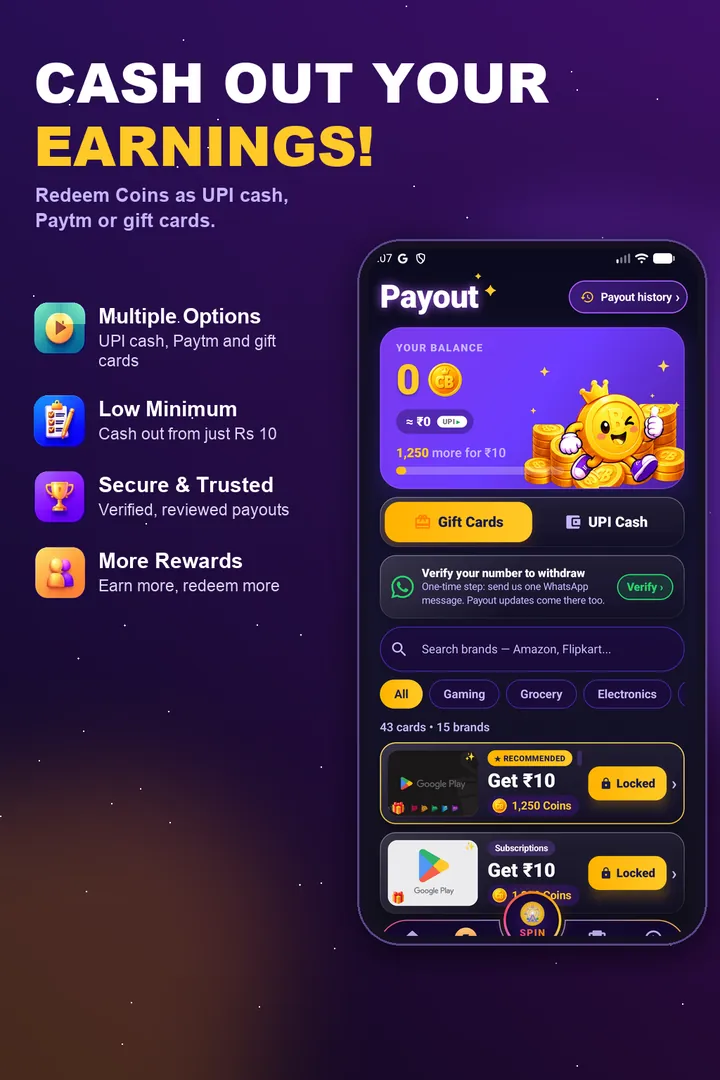
- 1. Open CashBoo and head to the Payout (Redeem) area.
- 2. Select UPI cash, then choose ₹500 or ₹1,000.
- 3. Paste your UPI ID. Copy it from your payments app instead of typing it from memory.
- 4. Read the pasted ID once more, character by character, and confirm.
- 5. The Coins leave your balance straight away, and the request appears with the status in progress.
- 6. Allow for review. UPI payouts are checked and usually arrive within 72 hours.
- 7. Look for the credit in your UPI app or bank statement. The sender name may be the payment partner rather than CashBoo.
The UPI ID: small detail, big consequences
More transfers fail because of a mistyped UPI ID than for any other reason. The ID, sometimes called a VPA, follows a handle@provider pattern. Examples look like anita.sharma@okicici, rohit@ybl for PhonePe, or 9812345678@paytm. To get yours, open whichever UPI app you use, tap your profile picture and copy the ID printed there. A single wrong character can make the transfer bounce back, and in the worst case it could match somebody else's real ID. Pasting takes two seconds and removes that risk.
Why there is a waiting period
The bank transfer itself is fast; the time goes into review. While your request says in progress, CashBoo confirms that the Coins behind it were earned genuinely (survey and offer partners have to confirm completions), runs routine fraud checks and then hands the batch to the payment partner. UPI payouts usually arrive within 72 hours of the request. Gift cards skip the bank entirely, so they are usually delivered inside the app within a few hours. Our guide on how long a reward app payout takes goes deeper into timing.
So, if the status still reads in progress and you are inside that window, there is nothing to do. It is a queue, not a problem. Start asking questions only once the window has clearly passed.
When a payout does not go through
- ID typo or an inactive ID: the money bounces. Copy the correct ID from your UPI app and request again, or ask support to update it.
- Brand-new account: a redemption made on the first day is often held for a manual look. Keep using the app normally for a day or two and the hold clears.
- Fraud review: several accounts on one phone, a VPN, or unusual referral activity can trigger a manual check. One honest account per person is the simplest way to avoid it.
- Coins never arrived to begin with: that is an earning issue rather than a payout issue. Our guide on what to do when a reward is not credited walks through it.
- Bank or network slowness: occasionally the delay sits with the bank. Give it one more working day before raising a ticket.
Gift card or bank transfer?
Think of a homemaker who wants a Google Play card for her son's exam-prep app, versus a commuter who wants cash to put towards his monthly pass. The first person is better off with a gift card: the bar is only ₹10 and delivery is usually within hours. The second person wants UPI cash, which can be spent anywhere but needs a larger balance and a review of up to about 72 hours. Neither option is more real than the other; they simply suit different goals.
Keep your money safe
- You do not need a UPI PIN or OTP to receive money. Anyone asking for one, even someone claiming to be support, is attempting fraud.
- CashBoo never charges a fee to release a withdrawal. A message asking you to pay to unlock a payout is a scam.
- Redeem only inside the official app. Ignore Telegram or WhatsApp contacts offering to process your payout for you.
- The Reserve Bank of India publishes easy-to-read digital payment safety material at rbi.org.in.
Five things to confirm before tapping Redeem
- Your balance covers the option: 1,250 Coins for a ₹10 gift card, 94,500 Coins for ₹500 in UPI cash.
- Your UPI ID has been pasted, not typed.
- You have one account only, and it is more than a day old.
- You expect gift cards within a few hours and UPI cash usually within 72 hours.
- Anything still unclear? The CashBoo FAQ covers limits, delays and reviews.
Frequently asked questions
How many Coins do I need for UPI cash on CashBoo?
UPI cash is paid in ₹500 or ₹1,000 amounts at 189 Coins per rupee, so ₹500 needs 94,500 Coins. If you want something sooner, gift cards start at ₹10, which is 1,250 Coins.
When will the money reach my bank?
UPI payouts go through a review first and usually arrive within 72 hours. Gift cards do not need a bank transfer and are usually delivered in the app within a few hours.
My UPI transfer failed. What went wrong?
Usually the UPI ID was mistyped or is no longer active. A very new account or a fraud check caused by multiple accounts can also hold a payout. Paste your exact ID from your UPI app and request again, or contact support.
Is there any charge for withdrawing?
No. Redeeming on CashBoo is free. If anyone asks you to pay to unlock a withdrawal, treat it as a scam.
Can I send the cash to my Paytm or PhonePe UPI ID?
Yes, any valid UPI ID works, whether it ends in @paytm, @ybl or a bank handle. Copy it from the app's profile screen so there are no typos.